What You'll Learn
In the Day 2 labs, you pasted data into Kiro or generated CSV files. That works for prototyping — but in production, your AI agent needs to connect to data sources directly. That's what MCP (Model Context Protocol) does.
Without MCP (Day 2)
You paste CSV data into the chat, or Kiro reads files from the workspace. Manual, one-at-a-time.
With MCP (Day 3)
Kiro connects to a database and queries it directly. Ask "show me all RED-rated merchants" and it runs the SQL for you.
| Step | Duration | What you do |
|---|---|---|
| Step 1 | 5 min | Set up the database and MCP connection |
| Step 2 | 10 min | Query the database through Kiro — no SQL knowledge needed |
| Step 3 | 10 min | Build a fraud detection skill that uses MCP data |
Step 1: Set Up the Database & MCP Connection
Model Context Protocol (MCP) is an open standard that connects AI to external tools and data sources. Think of it as a USB cable between Kiro and your systems:
- MCP Server = the data source (database, API, file system)
- MCP Client = Kiro (the AI that uses the data)
- You don't write code — you configure a connection, and Kiro can query it
In this lab, we'll connect Kiro to a SQLite database containing AnyCompany's merchant and transaction data.
1a. Create the database
First, download the setup files and extract them into your workspace:
create_database.py— Python script that creates the SQLite database with 12 merchants, 1,000+ transactions, and compliance alertsmcp-config-sample.json— Sample MCP configuration for the SQLite server
Extract both files into a lab9-fraud-detection/ folder in your workspace — following the same naming pattern as the Day 2 labs.
Then in Kiro, start a New Session and paste:
anycompany.db1b. Configure the MCP connection
Now connect Kiro to the database. In the same session, paste:
uv first. Run in terminal: pip install uv or brew install uv. Then restart Kiro. The uvx command downloads and runs the SQLite MCP server automatically — no separate installation needed.
merchants, transactions, compliance_alerts. If you see them, the MCP connection is working.🔍 Verify: Check the MCP Server panel in Kiro
Click the Kiro icon (①) in the left sidebar → expand MCP SERVERS (②). You should see anycompany-db with a green checkmark and 6 tools listed:
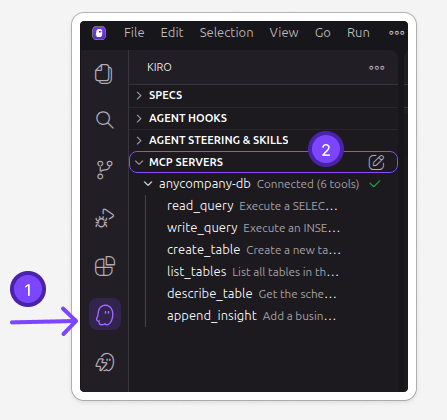
If the server shows "Disconnected" or doesn't appear, check that .kiro/settings/mcp.json was created correctly and that uvx is installed (pip install uv).
Step 2: Query the Database Through Kiro
Now the powerful part — ask Kiro questions in plain English, and it queries the database for you. You don't need to know SQL.
Try these queries:
You asked questions in plain English. Kiro translated them into SQL queries, ran them against the database via MCP, and formatted the results for you. You didn't write a single line of SQL.
This is the difference MCP makes:
- Without MCP: Export data to CSV → paste into chat → AI analyzes what you gave it
- With MCP: AI queries the database directly → gets exactly what it needs → analyzes live data
In production, this same pattern connects to your real databases — merchant systems, transaction platforms, compliance tools. The AI becomes a team member who can look things up on their own.
Step 3: Build a Fraud Detection Skill with MCP
Now combine what you learned in Lab 8 (skills + hooks) with MCP. Create a fraud detection skill that queries the database automatically.
Test the skill manually
First, trigger the skill by asking Kiro to investigate a specific merchant:
- Did Kiro query the database (you should see MCP tool calls in the response)?
- Does the report include real data from the database (not hallucinated)?
- Are the fraud patterns detected (amount anomalies, high chargeback rate)?
- Is there a risk score and recommended action?
Test the hook — simulate a compliance alert
In production, compliance alerts arrive as files from your monitoring system. Let's simulate one to test the hook.
Hooks trigger on files created by you in the IDE, not files created by the agent. This is by design — it simulates how a real alert would arrive from an external system.
Do this manually in Kiro:
- Right-click the
lab9-fraud-detection/folder in the file explorer - Select New File
- Name it:
MC-1007-alert.alert - Paste the content below and save (Ctrl+S / Cmd+S)
The moment you save the
.alert file, the hook fires and Kiro will automatically:
- Detect the new
.alertfile (hook trigger) - Activate the fraud-investigation skill
- Read the alert to identify the merchant (MC-1007)
- Query the database via MCP for the merchant's profile, transactions, and existing alerts
- Generate a full investigation report
This is the complete automation loop: alert arrives → hook triggers → skill activates → MCP queries data → report generated. No human intervention needed for the investigation — only for the final decision.
- Did Kiro start processing automatically after the file was created?
- Did it query the database for MC-1007 (Saigon Wheels)?
- Does the report mention the expired KYC and 4.5% chargeback rate?
- Is the recommended action appropriate (likely: Block or Suspend pending KYC renewal)?
If the hook didn't trigger automatically, check that the hook file was created correctly in .kiro/hooks/ and that it's configured to watch for *.alert files.
🎉 What You Built
- 🔌 Connected Kiro to a database via MCP — no code, just configuration
- 🔍 Queried merchant and transaction data in plain English
- 🛠️ Created a fraud detection skill that uses MCP to access live data
- ⚡ Combined all 4 layers: Steering + Skills + Hooks + MCP
This is the complete Kiro automation stack. In production, replace the SQLite database with your real merchant database — the skill and MCP connection pattern stays the same.
The Complete Kiro Stack
You've now built all 4 layers:
| Layer | What it does | You built this in |
|---|---|---|
| Steering | Global rules (currency, PII, ratings) | Lab 8, Step 1 |
| Skills | On-demand expertise (risk assessment, fraud detection) | Lab 8, Steps 2-5 + this lab |
| Hooks | Auto-triggers (new file → run skill) | Lab 8, Step 3 |
| MCP | Data connections (database, APIs) | This lab |
When you fill in the "MCP connections needed" section of your canvas, think about what data sources your workflow needs. Common MCP connections for finance teams:
| MCP Server | Connects to | Use case |
|---|---|---|
| SQLite / PostgreSQL | Databases | Query merchant data, transaction history, compliance records |
| Filesystem | File directories | Process folders of invoices, scan document repositories |
| Slack | Team messaging | Send alerts when RED-rated merchant detected |
| Google Drive / S3 | Document storage | Read policy documents for RAG grounding |
| Custom API | Internal systems | Call your risk scoring API, KYC verification service |
You specify what connections are needed in the canvas. Your tech team configures the actual MCP servers.