Build an automated invoice processing pipeline that reads PDF invoices, extracts financial data, validates against purchase orders, and flags discrepancies.
30 minutes
What You'll Build
A Python script that generates realistic vendor invoice PDFs
A PDF extraction pipeline that reads invoices and converts them to structured data
Automatic validation against a purchase order CSV file
A styled HTML report showing extraction results, match status, and flagged discrepancies
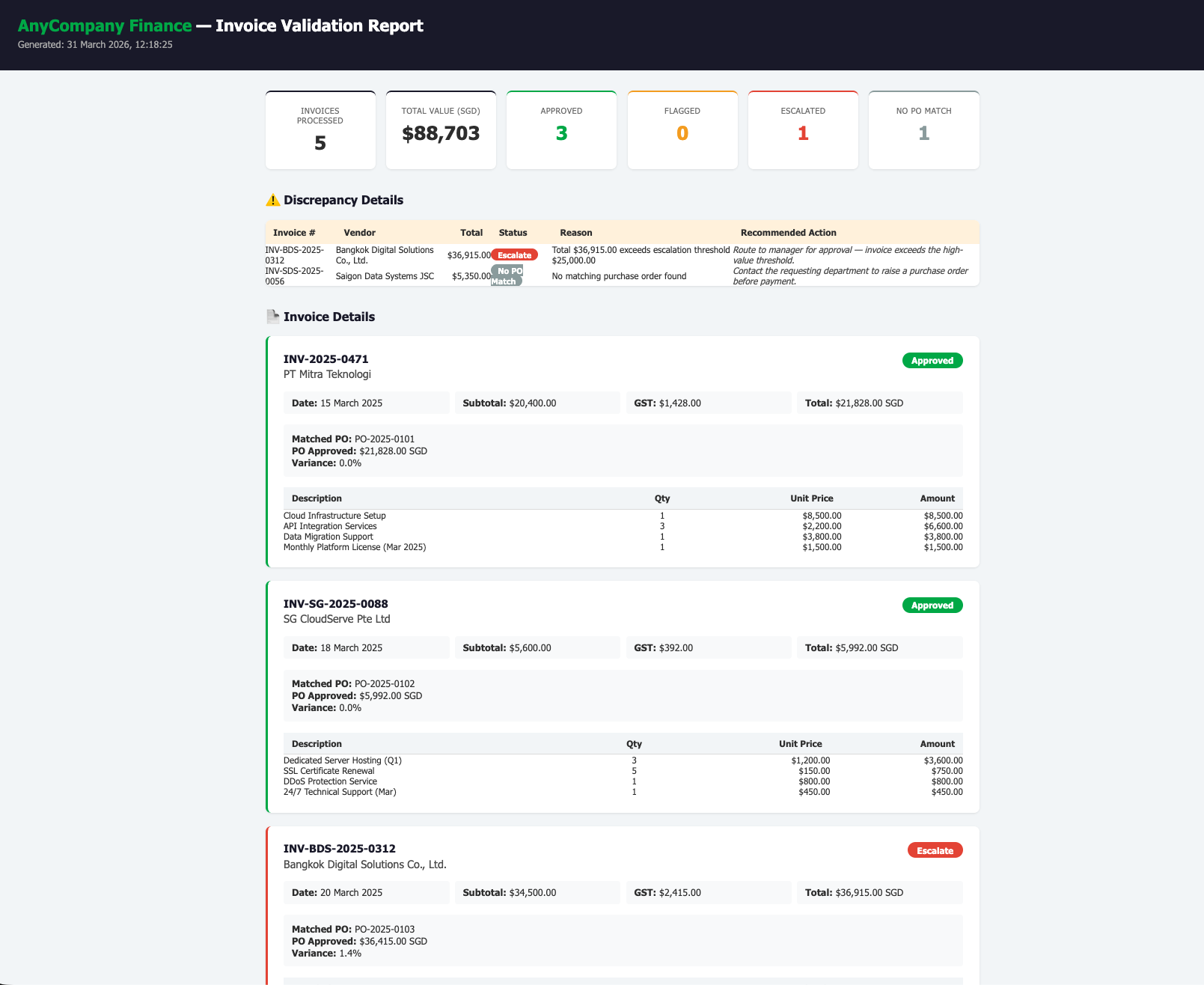
Preview: Final Validation Report
Here's what the finished HTML report looks like — you'll build this entirely through conversation with Kiro:
Business Value
Automate manual invoice data entry that currently takes hours per batch
Extract structured data from PDF invoices — the most common format in real finance workflows
Flag mismatches between invoices and POs before payment approval
Prototype tools that would normally require a development team
Step
Duration
Description
Generate Sample PDF Invoices
5 min
Let Kiro create realistic PDF invoices and PO data
Build the PDF Extractor
10 min
Extract structured data from PDF invoices
Validate Against POs
8 min
Match invoices to POs and flag discrepancies
Generate HTML Report
7 min
Professional validation report with status dashboard
Step 1: Generate Sample PDF Invoices
First, we need realistic PDF invoices to work with. In the Kiro chat panel, start a New Session in Vibe mode and paste:
PROMPT — Copy & paste into Kiro
Create a folder called "invoice-processing" in the current workspace.
Build a Python script called generate_invoices.py that creates 5 realistic PDF invoices in an "invoices" subfolder.
Use the reportlab library to generate professional-looking PDF invoices. Each invoice should have:
- A header with the vendor company name, address, and tax ID
- "INVOICE" title
- Bill To: AnyCompany Financial Group, 3 Media Close, Singapore 138498
- Invoice number, invoice date, due date, payment terms (Net 30)
- Currency: SGD
- A table of line items with columns: Description, Quantity, Unit Price, Amount
- Subtotal, GST (7%), and Total
- Payment instructions with bank name, account number, and SWIFT code
- Professional styling with borders, shading, and clean fonts
Use these 5 vendors with realistic Southeast Asian details:
1. PT Mitra Teknologi (Jakarta) — Cloud infrastructure services, total ~$21,800 SGD
2. SG CloudServe Pte Ltd (Singapore) — Server hosting & security, total ~$6,000 SGD
3. Bangkok Digital Solutions Co. (Bangkok) — Payment gateway integration, total ~$36,900 SGD
4. KL Fintech Consulting Sdn Bhd (Kuala Lumpur) — Compliance audit & training, total ~$18,600 SGD
5. Saigon Data Systems JSC (Ho Chi Minh City) — Data analytics platform, total ~$5,350 SGD
Name the files invoice_001.pdf through invoice_005.pdf.
Install reportlab automatically. Run the script to generate all 5 PDFs.
Open the generated PDFs from the file explorer to verify they look like real invoices.
Now create the supporting data files. In the same chat session, paste:
PROMPT — Copy & paste into Kiro
In the invoice-processing folder, create two more files:
1. "purchase_orders.csv" with columns: po_number, vendor, description, approved_amount, currency, status
Include 6 POs:
- PO-2025-0101: PT Mitra Teknologi, approved $21,828.00 SGD (exact match to invoice 1)
- PO-2025-0102: SG CloudServe Pte Ltd, approved $5,992.00 SGD (exact match to invoice 2)
- PO-2025-0103: Bangkok Digital Solutions, approved $36,415.00 SGD ($500 LESS than invoice 3 — to test discrepancy detection)
- PO-2025-0104: KL Fintech Consulting Sdn Bhd, approved $18,618.00 SGD (exact match to invoice 4)
- PO-2025-0105: Manila Tech Partners Inc., approved $12,500.00 SGD (no matching invoice — extra PO)
- PO-2025-0106: PT Solusi Digital Nusantara, approved $28,000.00 SGD (no matching invoice)
Note: Invoice 5 (Saigon Data Systems) has NO matching PO.
2. "validation_rules.json" with:
- maximum_variance_pct: 2
- required_fields: ["vendor", "invoice_number", "date", "total"]
- auto_approve_threshold_sgd: 5000
- escalation_threshold_sgd: 25000
✅ Checkpoint: 5 PDF invoices generated in invoices/ folder · purchase_orders.csv with 6 POs (1 deliberate mismatch) · validation_rules.json with business rules
Understanding the Test Data
We've deliberately set up the data to simulate real-world scenarios that any organization encounters when processing vendor invoices. Here's what each piece tests:
📋 Why 6 POs but only 5 invoices?
In real business operations, purchase orders and invoices don't always match one-to-one. Our test data covers all common scenarios:
4 invoices match a PO → The happy path. Invoice amount matches the approved PO amount. These should be auto-approved.
1 invoice has a PO but the amount is off by $500 (Bangkok Digital Solutions) → Tests discrepancy detection. In real life, this could be a scope change, overcharge, or billing error.
1 invoice has NO matching PO (Saigon Data Systems) → Tests unauthorized spend detection. Someone received services without raising a purchase order first.
2 POs have no matching invoice (Manila Tech Partners, PT Solusi Digital) → These sit in the PO file but no bill has arrived yet. Could indicate outstanding work or delayed billing.
⚙️ What do the validation rules mean?
The validation_rules.json file defines the business rules that the validation script will use in Step 3. Think of these as the "policies" your finance team follows:
maximum_variance_pct: 2 → If an invoice total differs from the PO approved amount by more than 2%, flag it for review. Small differences (under 2%) are tolerated — they might be rounding, minor scope adjustments, or currency conversion differences.
required_fields → Every invoice must have a vendor name, invoice number, date, and total. If any field is missing, the invoice is flagged as incomplete.
auto_approve_threshold_sgd: 5,000 → Invoices under $5,000 SGD that match a PO can be approved automatically without human review.
escalation_threshold_sgd: 25,000 → Invoices over $25,000 SGD require manager approval regardless of whether they match a PO — this is a common internal control for high-value payments.
These rules are configurable — in a real deployment, your team would adjust the thresholds to match your organization's approval policies.
Step 2: Build the PDF Extractor
Now the key step — extracting structured data from PDF invoices. In the same chat session, paste:
PROMPT — Copy & paste into Kiro
You are a Senior Accounts Payable Analyst with 10 years of experience processing vendor invoices across Southeast Asia. You understand invoice formats, PO matching rules, and common discrepancies.
Build a Python script called invoice_extractor.py in the invoice-processing folder that:
1. Reads all PDF files from the invoices/ folder using PyMuPDF (pymupdf)
2. For each PDF invoice, extracts the raw text content
3. Parses the extracted text to identify:
- Vendor name (from the header/sender section)
- Invoice number
- Invoice date
- Line items (description, quantity, unit price, amount)
- Subtotal, GST/tax amount, total
Note: In PDF-extracted text, labels like "Subtotal:", "GST (7%):", and "TOTAL:" may appear on a separate line from their dollar values. Make sure the parser handles both same-line and next-line value patterns.
4. Saves the extracted data for each invoice as a JSON file in an "extracted" subfolder
(e.g., extracted/invoice_001.json)
5. Also creates a consolidated "all_invoices.csv" with one row per invoice:
Columns: filename, vendor, invoice_number, date, num_line_items, subtotal, tax, total
6. Prints a summary showing:
- Each invoice processed with vendor name and total
- Any extraction warnings (missing fields, parsing issues)
- Total invoices processed and combined value
Install pymupdf automatically. Run the script after creating it.
✅ Checkpoint: All 5 PDFs read and text extracted · Individual JSON files in extracted/ folder · Consolidated CSV created · Summary printed
Step 3: Validate Against Purchase Orders
This is where the validation rules from Step 1 come into play. The script will load the rules and apply them to each invoice — checking for PO matches, amount variances, missing fields, and high-value thresholds. The result is an automated decision for each invoice: Approved, Flagged, Escalated, or No PO Match.
In the same chat session, paste:
PROMPT — Copy & paste into Kiro
You are a Senior Accounts Payable Analyst. Your job is to validate every invoice against approved purchase orders before payment is released.
Add a validation module to invoice_extractor.py (or create a new script called invoice_validator.py) that:
1. Loads the extracted invoice data from the extracted/ JSON files
2. Loads purchase_orders.csv and validation_rules.json
3. For each invoice, performs these checks:
- Are all required fields present? (vendor, invoice_number, date, total)
- Does a matching PO exist? (match by vendor name — use fuzzy matching since vendor names may differ slightly between invoice and PO)
- If PO exists, is the invoice total within the allowed variance (2%) of the PO approved amount?
- Does the invoice total exceed the escalation threshold ($25,000)?
4. Assigns a status to each invoice:
- "Approved" — matches PO within variance, below escalation threshold
- "Flagged" — variance exceeds allowed percentage
- "Escalate" — total exceeds escalation threshold (requires manager approval)
- "No PO Match" — no matching purchase order found
5. Prints a formatted summary table:
Invoice #, Vendor, Total (SGD), Matched PO, Variance %, Status
Plus totals: invoices processed, total value, counts by status
Run the script.
✅ Checkpoint: All 5 invoices validated · PO matching working (4 matched, 1 no match) · Bangkok Digital Solutions flagged or escalated · Summary table printed
Step 4: Generate the Validation Report
In the same chat session, paste:
PROMPT — Copy & paste into Kiro
Add an HTML report generator that creates invoice_report.html in the invoice-processing folder:
1. Header: "AnyCompany Finance — Invoice Validation Report" with current date and time
2. Summary dashboard at the top with colored badge cards:
- Total invoices processed
- Total value (SGD)
- Approved count (green)
- Flagged count (yellow)
- Escalated count (red)
- No PO Match count (gray)
3. A detailed card for each invoice showing:
- All extracted fields (vendor, invoice number, date)
- Line items table
- Matched PO details with approved amount (or "No Match" warning)
- Variance percentage if PO exists
- Status with color-coded badge
4. A "Discrepancy Details" section listing only flagged/escalated/no-match invoices with:
- What triggered the flag
- Recommended action
5. Footer: "Generated by AnyCompany Finance Invoice Processor — For internal use only"
Professional theme: green (#00B14F) accent, dark header, white content, subtle borders.
Open the report in the browser after generating.
Step 5 (Optional): Add CSV Export
OPTIONAL PROMPT
Add a function that exports the validation results as invoice_validation_results.csv with columns:
invoice_number, vendor, invoice_date, total_sgd, matched_po, po_approved_amount, variance_pct, status, flag_reason
Run the export after the HTML report is generated.
What You Accomplished
📄 Generated realistic PDF invoices from Southeast Asian vendors
🔍 Built a PDF extraction pipeline that reads invoices and converts to structured data
✅ Matched invoices against purchase orders with fuzzy vendor matching
⚠️ Flagged discrepancies based on configurable business rules
📊 Generated a professional HTML validation report with status dashboard
This is the same workflow real finance teams use — except you built it in 30 minutes through conversation instead of weeks with a dev team.