๐Ÿ“Š Module 2: AnyCompany Pay Transaction Dashboard

Build a web-based transaction monitoring dashboard that displays transaction volumes, reconciliation status, and anomaly alerts.

28 minutes

What You'll Build

Preview: Transaction Dashboard

Here's what the finished dashboard looks like โ€” served from localhost and auto-refreshing every 60 seconds:
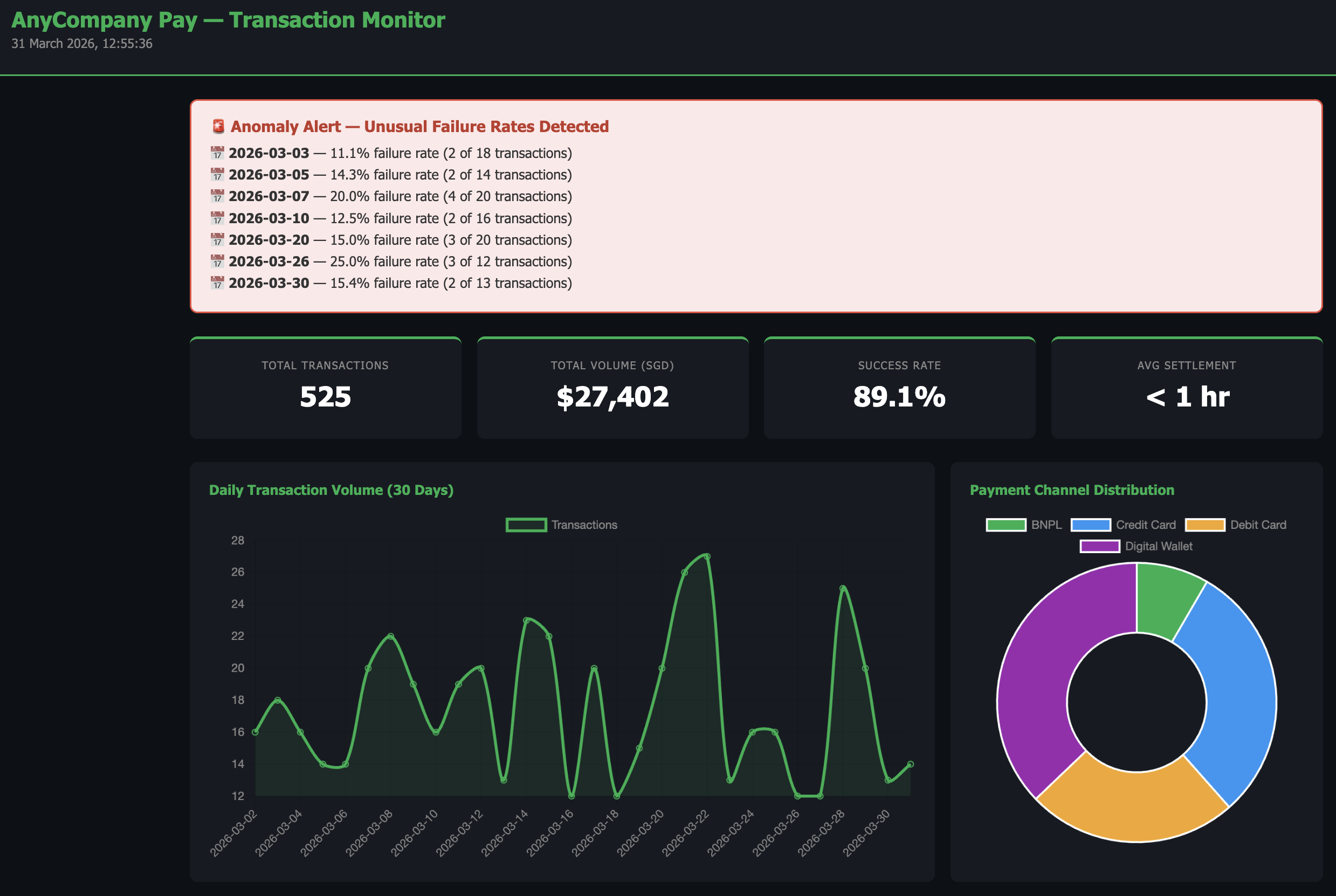
Transaction Dashboard Preview
StepDurationDescription
Generate Transaction Data3 minCreate realistic synthetic transaction data
Build the Dashboard Server10 minBuild a live localhost dashboard that reads the data
Inject New Data5 minAdd transactions while the server is running and watch it update
Add Reconciliation & Export10 minAdd settlement tracking, channel performance, and CSV export

Step 1: Generate Transaction Data

First, let's create realistic synthetic transaction data. In the Kiro chat panel, start a New Session in Vibe mode and paste:

PROMPT โ€” Copy & paste into Kiro
Create a folder called "anycompany-pay-dashboard" in the current workspace. Build a Python script called generate_data.py that creates a file called transactions.csv with 500 synthetic payment transactions for the last 30 days. Each transaction should have these fields: date, timestamp, transaction_id, merchant_name, amount_sgd, currency, payment_channel, status, settlement_status Requirements: - payment_channel: one of "Digital Wallet", "Credit Card", "Debit Card", "BNPL" (weighted 40%, 30%, 20%, 10%) - status: "success" (92%), "failed" (5%), "pending" (2%), "refunded" (1%) - settlement_status: "settled", "pending", or "delayed" (only successful transactions can be settled) - amount_sgd: average $45, range $2 to $500 - Higher transaction volumes on weekends (Sat/Sun) - Inject 2 anomaly days with unusually high failure rates (>15%) to simulate payment gateway issues - Use realistic merchant names (e.g., "FreshMart Express", "TechZone SG", "CloudKitchen Asia") - transaction_id format: TXN-000001 Run the script and print a summary showing: total transactions, date range, status breakdown, and which days are anomaly days.
โœ… Checkpoint: transactions.csv created with 500 transactions ยท Summary shows ~92% success rate ยท 2 anomaly days identified with >15% failure rate

Step 2: Build the Dashboard Server

Now let's build a live dashboard that reads this data. In the same chat session, paste:

PROMPT โ€” Copy & paste into Kiro
You are a Payment Operations Manager responsible for monitoring transaction health across all payment channels. You need clear visibility into daily volumes, failure rates, and settlement status. Build a Python script called dashboard.py in the anycompany-pay-dashboard folder that serves a transaction monitoring dashboard on localhost. The script should: - Read transactions.csv on every page request (so it picks up new data automatically) - Serve a single HTML page using Python's built-in http.server - Use Chart.js via CDN for all charts Dashboard layout (professional dark theme with green #00B14F accent): - IMPORTANT: All text on dark backgrounds must be white/light. All text on light-colored areas (alert banners, warning boxes) must use dark text (#333 or darker). Ensure high contrast and readability everywhere. - Header: "AnyCompany Pay โ€” Transaction Monitor" with current date/time - Summary cards row: Total Transactions, Total Volume (SGD), Success Rate, Avg Settlement Time - Anomaly alert banner: If any day has failure rate > 10%, show a prominent alert with light background and dark readable text, listing each anomaly date with its failure count and rate - Line chart: Daily transaction volume over 30 days - Stacked bar chart: Daily transactions by status (success=green, failed=red, pending=orange, refunded=gray) - Pie/doughnut chart: Transaction distribution by payment channel - Table: Last 20 transactions with color-coded status badges - Auto-refresh every 60 seconds - Footer: "AnyCompany Pay Operations Dashboard โ€” Data refreshed at [timestamp]" Install pandas automatically if needed. Run the script to start the server and open the dashboard in the browser.
โœ… Checkpoint: Server running on localhost ยท Dashboard showing summary cards, charts, and transaction table ยท Anomaly days flagged with readable alert banner
๐Ÿ’ก Why a local web server?

Unlike Module 1 which generated a static HTML file, this module runs a live web server on your machine. This is useful because:
  • The dashboard re-reads transactions.csv on every page load โ€” if the data changes, the dashboard updates automatically
  • The auto-refresh (every 60 seconds) means you can leave it open and it stays current โ€” just like a real monitoring dashboard
  • This pattern is how many internal business tools work โ€” a simple Python script serving a dashboard that anyone on the team can access

Step 3: Inject New Data and Watch the Dashboard Update

With the server still running, let's add new transactions and see the dashboard pick them up automatically. Open a new Kiro chat session (keep the server running in the previous session) and paste:

PROMPT โ€” Copy & paste into Kiro
Create a Python script called inject_transactions.py in the anycompany-pay-dashboard folder that: 1. Reads the existing transactions.csv 2. Appends 50 new transactions for today's date with these patterns: - 30 successful transactions (normal amounts $10-$100) - 10 failed transactions (to simulate a payment gateway issue) - 5 pending transactions - 5 refunded transactions - Use a mix of all payment channels - Use merchant names like "NewMerchant Alpha", "NewMerchant Beta" so they're easy to spot 3. Saves the updated transactions.csv 4. Prints a summary: "Injected 50 new transactions. Total now: X. Today's failure rate: Y%" Run the script. Then go back to the browser โ€” the dashboard will auto-refresh within 60 seconds and show the updated data, including a new anomaly alert for today's high failure rate.
โœ… Checkpoint: 50 new transactions injected ยท Dashboard auto-refreshed with updated totals ยท Today appears as a new anomaly day (20% failure rate)

Step 4: Add Reconciliation View and Export

In the same chat session, paste:

PROMPT โ€” Copy & paste into Kiro
Update dashboard.py to add two new sections to the dashboard: 1. "Settlement Reconciliation" section: - A table grouped by date showing: total transactions, settled count, pending count, delayed count, settlement rate % - Highlight any day with settlement rate below 95% in yellow (use dark text on yellow background for readability) - Show a bar chart of daily settlement rates 2. "Channel Performance" section: - A comparison table: payment channel, transaction count, total volume, success rate, avg amount - Highlight the best-performing channel in green and worst in red 3. Add a "Download CSV Report" button at the top that exports the full transaction data with a reconciliation status summary appended. Restart the server after updating. Ensure all new sections maintain high contrast text (dark text on light backgrounds, light text on dark backgrounds).

Step 5 (Optional): Make It Interactive

Take the dashboard to the next level with interactive features. In the same chat session, paste:

OPTIONAL PROMPT โ€” Interactive Features
Update dashboard.py to add interactive features to the dashboard: 1. Transaction Table Filtering: - Add a filter bar above the transaction table with: - A dropdown to filter by status (All, Success, Failed, Pending, Refunded) - A dropdown to filter by payment channel (All, Digital Wallet, Credit Card, Debit Card, BNPL) - A text search box to filter by merchant name - Filters should work client-side using JavaScript (no page reload needed) - Show a count of matching results: "Showing X of Y transactions" 2. Chart-to-Table Drill-Down: - When a user clicks on a bar in the "Daily Transactions by Status" stacked bar chart, update the transaction table below to show only transactions from that specific date - Show a "Viewing: [date]" label above the table when filtered, with a "Clear filter" button to reset - Use Chart.js onClick event handler for this 3. Status Summary Cards Click: - When a user clicks on the "Failed" or "Pending" summary card at the top, filter the transaction table to show only that status Keep all interactive features working with the auto-refresh. Use only client-side JavaScript โ€” no additional server endpoints needed. Restart the server after updating.

What You Accomplished

  • ๐Ÿ“Š Built a live transaction monitoring dashboard served from localhost
  • ๐Ÿ” Generated realistic synthetic data with anomaly patterns
  • ๐Ÿ”„ Injected new data and watched the dashboard update automatically
  • โš ๏ธ Automated anomaly detection with visual alerts
  • ๐Ÿ’ฐ Added settlement reconciliation tracking and channel performance
  • ๐Ÿ“ Added CSV export for downstream reporting
  • ๐Ÿ–ฑ๏ธ (Optional) Added interactive filtering and chart drill-down

You've built a real-time monitoring tool with interactive features โ€” the same pattern used by internal dashboards at many companies. All from natural language descriptions.